Docs
What Zorilla is
Zorilla is an automation tool that runs locally. You wire functions together on a canvas: something starts a run, other functions read data, decide what to do with it, and send it somewhere. It watches prices, reads contracts, calls APIs, posts to Discord and Slack, and sends email.
It ships with 17 service integrations, 51 functions, and reads Ethereum (Solidity). It cannot sign a transaction, and there are other limits worth knowing before you start, listed at the end.
Installing it
What you need
- Node 20 or newer, and a terminal to type one command into.
- A computer that stays on while your automations run.
- An account with whatever services you want to use.
Getting it
One command, which fetches it, starts it and opens the page:
npx github:getzorilla/zorillaAppTo keep a copy you can edit, clone it instead:
git clone https://github.com/getzorilla/zorillaApp
cd zorillaApp
npm install
npm start
Either way it opens at http://127.0.0.1:5177. There is no build step and no configuration file. Your workspace opens with 10 demos in an Examples group, all switched off. Two of them run with no keys at all.
Where your things live
Everything is under ~/.zorilla: your automations in workflows/, run history in runs/, saved keys encrypted in vault.json, and anything you add yourself in themes/, integrations/ and nodes/. Back up that folder and you have backed up everything.
Settings
| variable | what it does |
|---|---|
| ZORILLA_PORT | Which port to listen on. Defaults to 5177. |
| ZORILLA_HOME | Where to keep everything. Defaults to ~/.zorilla. |
| ZORILLA_PASSPHRASE | Locks the vault with a passphrase instead of a key file on the machine. |
| ZORILLA_PUBLIC_URL | The address to show for webhooks when you run your own tunnel. |
Your first automation
Two things, in order. Something that works in three clicks, then one you build yourself that posts the ETH price to a Discord channel. Fifteen minutes for both, and you need a Discord server you can make a webhook in for the second half.
1. Open the workspace
Zorilla opens on your workspace with an Examples group already in it: the 10 demos that ship with it, tagged Example, switched off until you press run. Delete any of them and they stay deleted.
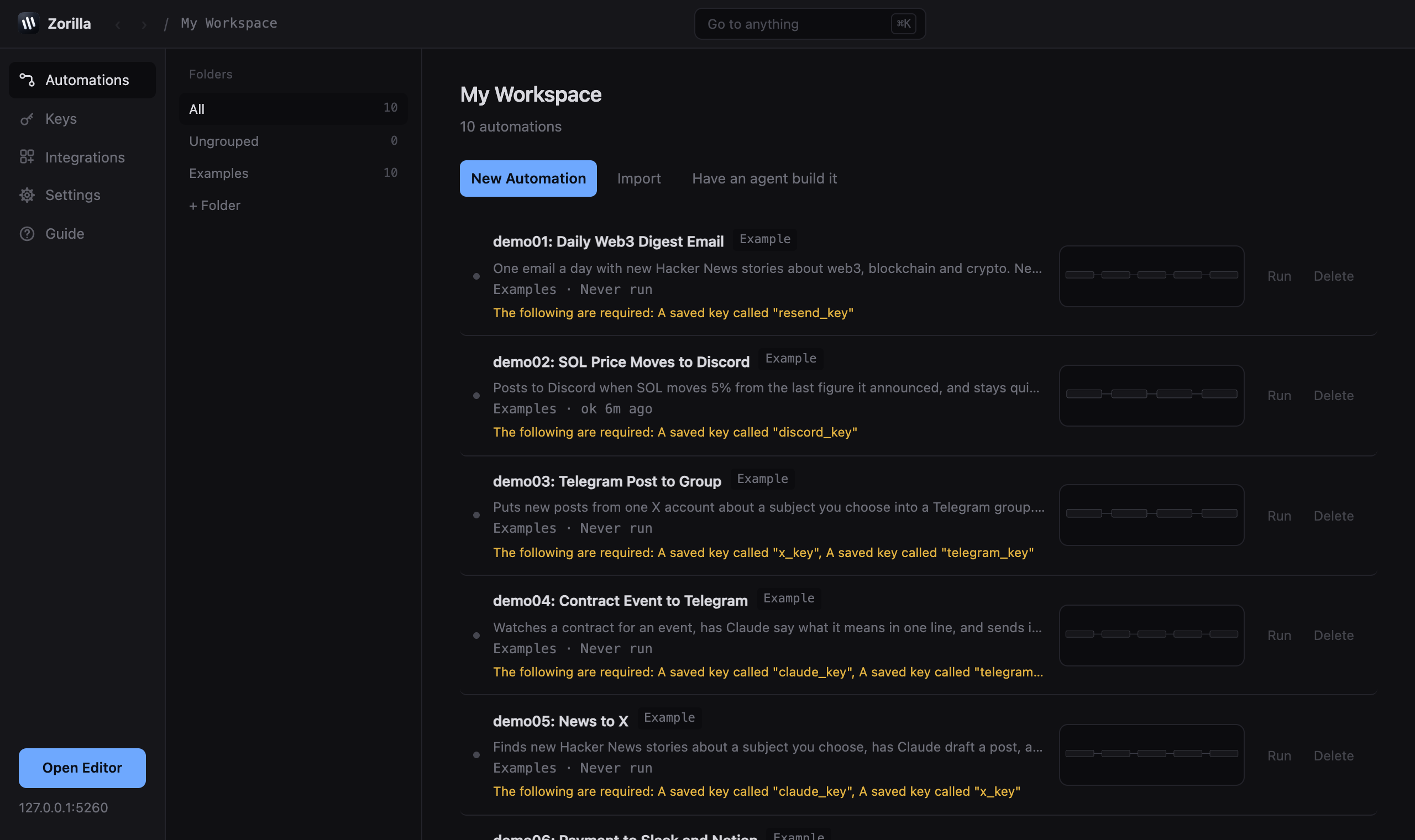 123
123- 1workspace, keys, integrations, settings, guide
- 2start from nothing, bring in a file, or have an agent write it
- 3straight to the canvas
2. Take one and press run
The demos are numbered, and the ones that need no keys are marked Ready. Take demo09: Wallet Balance Watch: it reads a wallet's balance on Ethereum and writes it in the log, and says something separate when the balance has moved since it last mentioned it. Open it and press run in the top right. The strip along the bottom opens the log, and the balance is in it.
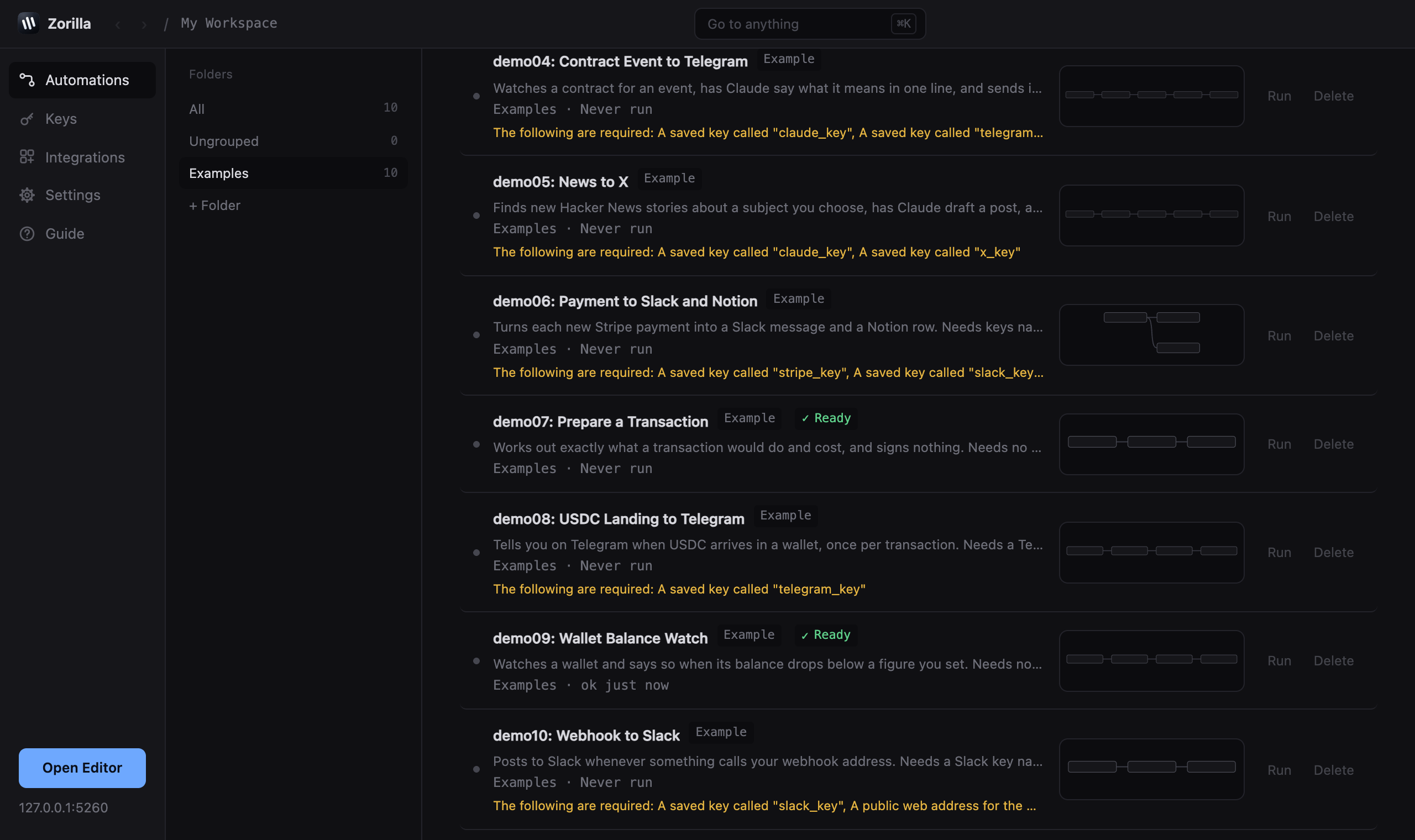 123
123- 1runs with nothing set up
- 2open it
- 3what the others need first
3. Give Discord somewhere to post
Now the one you build. In Discord, open the channel you want to post in, go to channel settings, integrations, webhooks, and copy the webhook address. That address is the secret: anyone holding it can post to that channel, so treat it like a password.
In Zorilla, go to Keys, choose Discord, paste the address in, and name it discord_key. Press save. Zorilla checks it with Discord and writes down where it points, so from then on every function using that key says which channel it posts to instead of just showing a name.
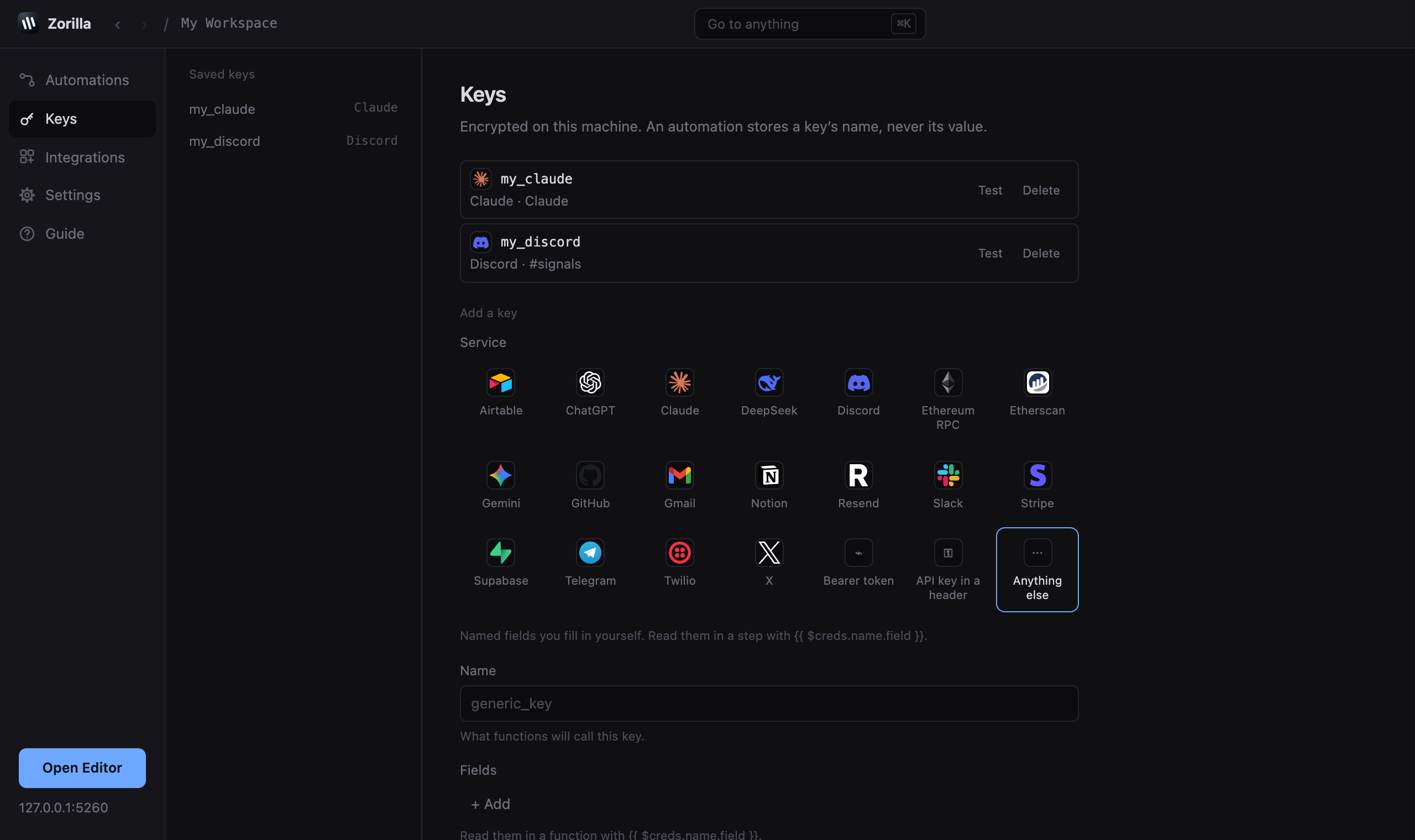 123
123- 1the keys you have saved
- 2pick the service
- 3the name your functions will call it by
4. Put the functions on the canvas
Start a new automation and you get the editor. The list on the left is every function you can use, with services grouped one row each. Open Discord and you see what Discord can do. Click a function to drop it in the middle of the canvas, or drag it where you want it.
You need three: Schedule, under starting a run. Coin price, under CoinGecko. Post to Discord, under Discord.
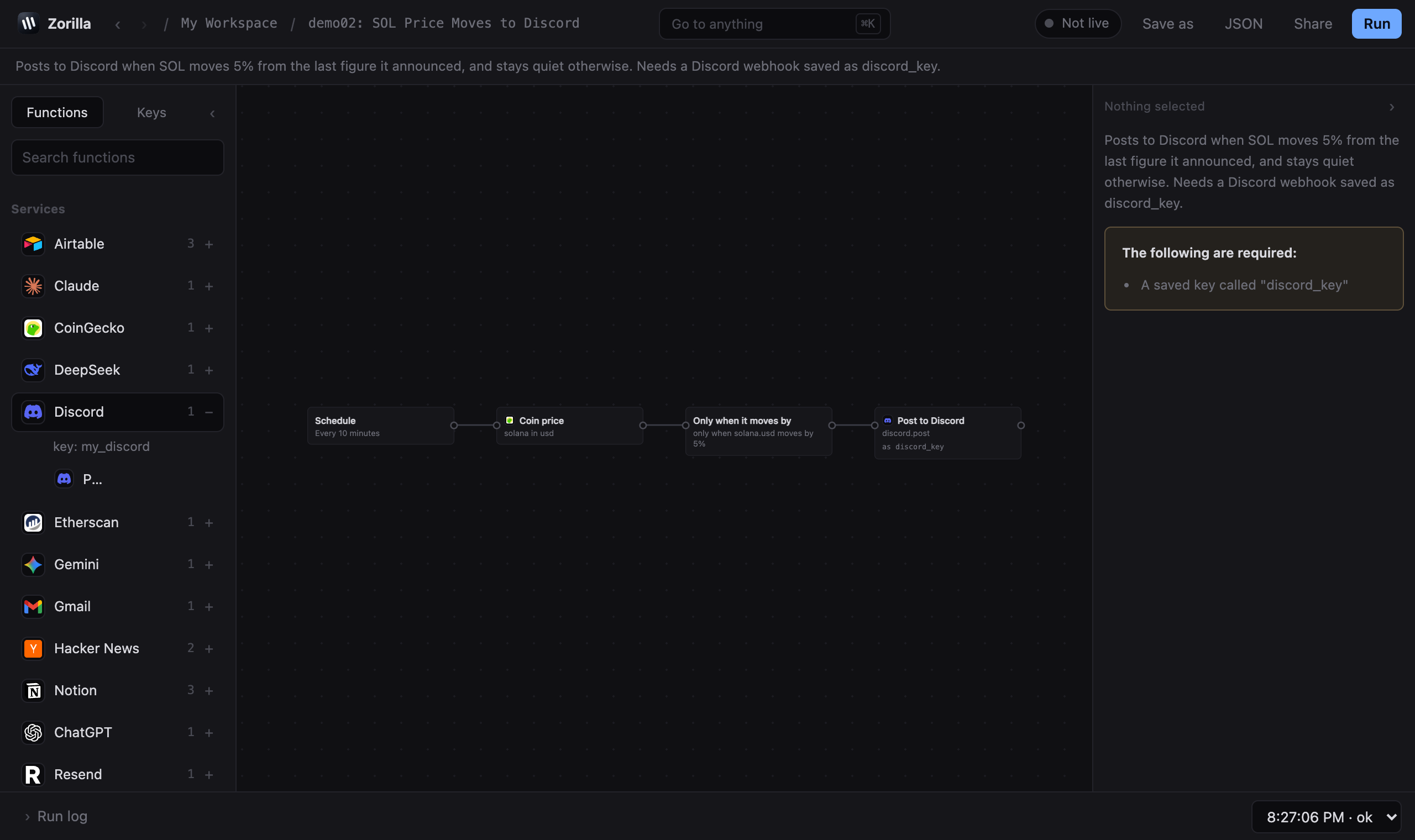 12
12- 1a service, opened
- 2one of its functions
5. Join them up and fill them in
Every function has a circle on each side. Drag from the right circle of one to the next to join them, and items flow along that wire. Click a wire to remove it. Right-click anywhere for copy, paste, undo and the rest.
Click a function and the panel on the right is its settings. Set the schedule to every 10 minutes, the coin to ethereum, and on the Discord function choose the key you saved and write the message. Double braces pull a value out of whatever the function before it produced.
ETH is ${{ $json.ethereum.usd }}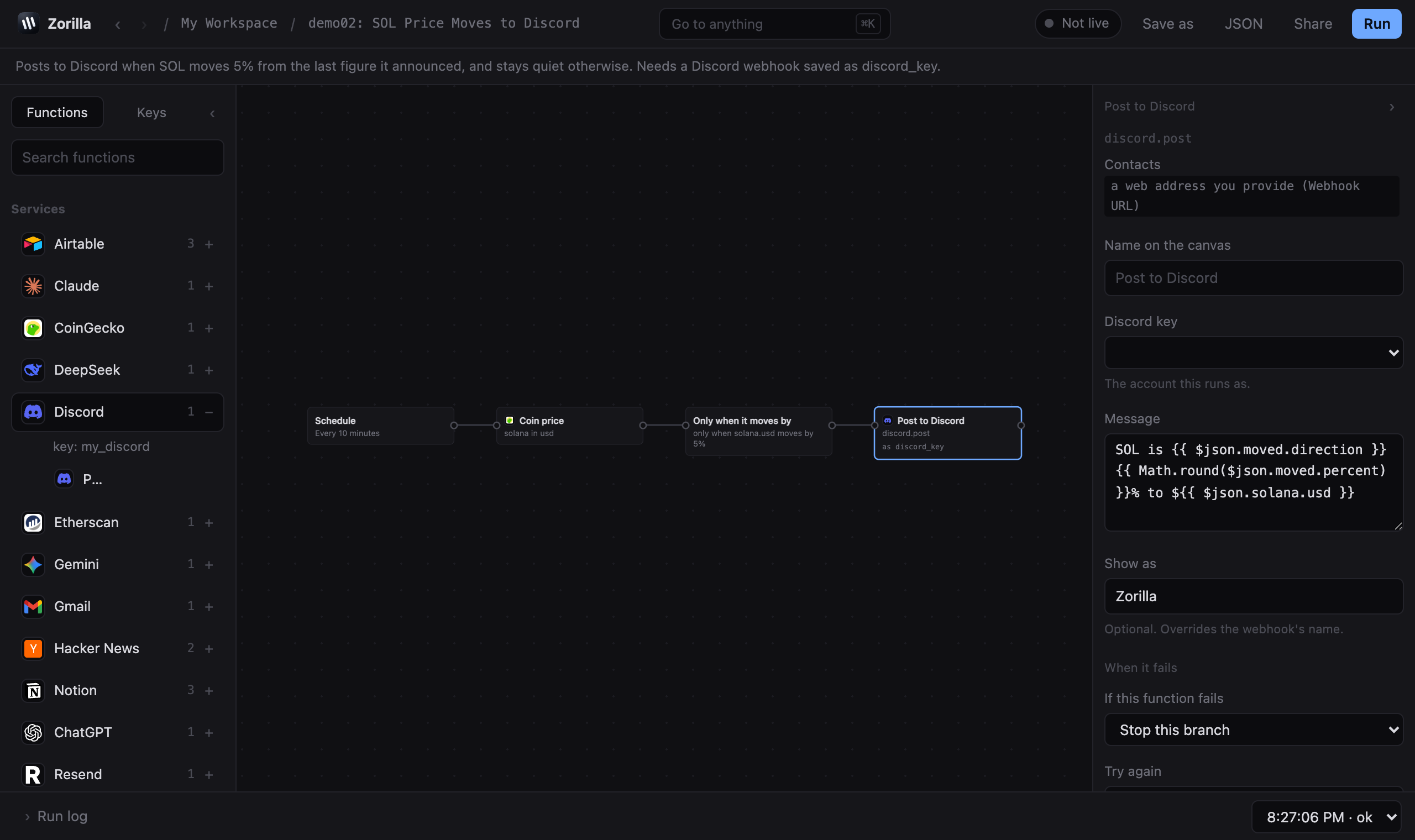 123
123- 1which key it posts with
- 2the message
- 3what happens if it fails
6. Run it, then leave it running
Press run. The log shows every function, what it received, what it sent, and how long it took. If something is wrong, that is where it says so, in words rather than error codes.
When you are happy with it, press the switch in the top right so it reads Live. From then on it runs on its own every ten minutes, for as long as your computer is awake. Press Share to save it as a file you can send to somebody, naming the keys it needs and never their values.
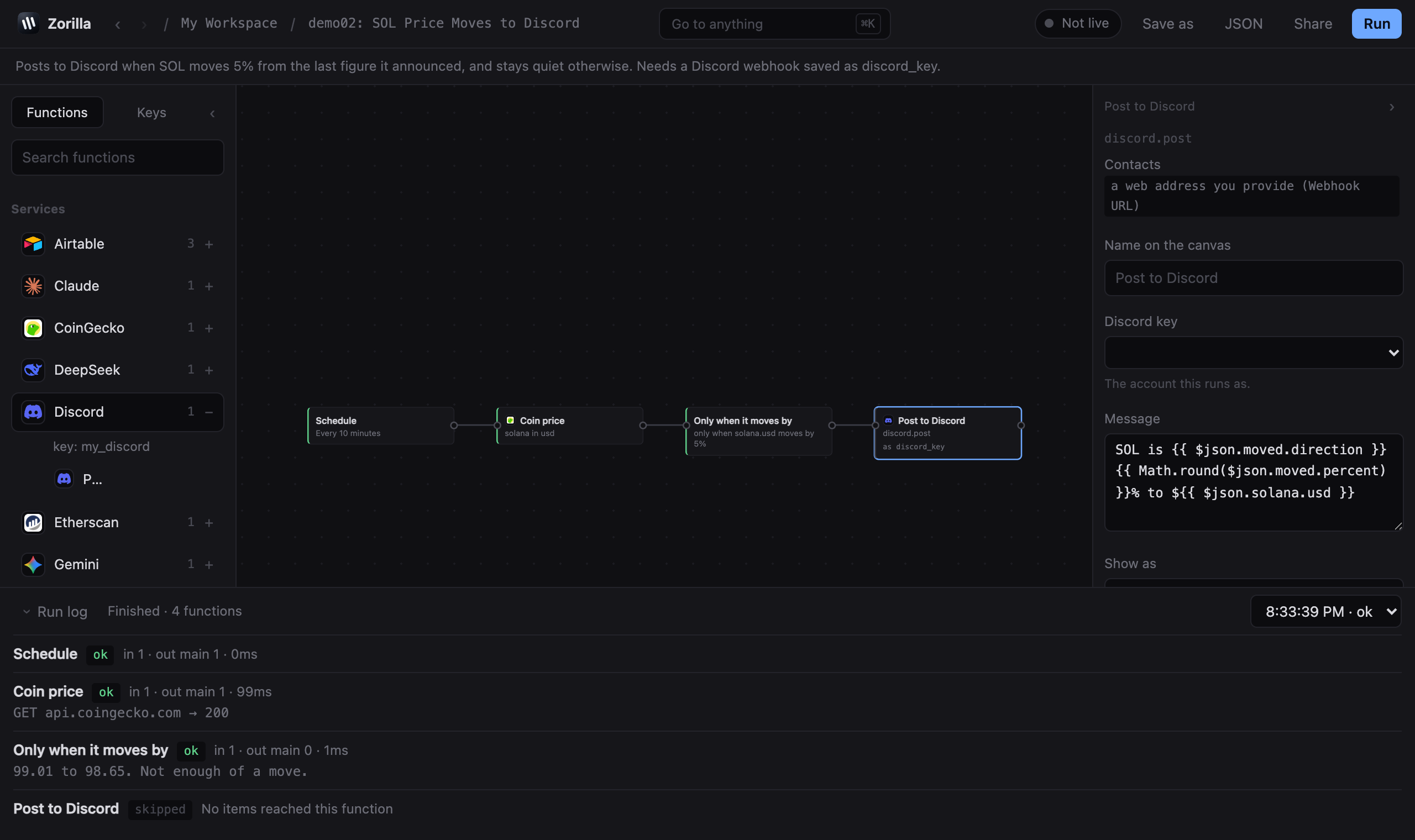 123
123- 1live, or only when you press run
- 2run it now
- 3every function, what it got and what it sent
Functions and items
Every function takes a list of items and hands back a list of items. An item is a piece of JSON: { json: { ... } }. That one shape is why any function can feed any other one.
Most functions run once per item. A price function that receives three items runs three times and sends three on. Functions that filter send fewer items than they got. A function that returns nothing at all passes its input through untouched.
A function that fails sends nothing, so everything downstream of it is skipped and says so in the run log. Branches that do not depend on it carry on.
What starts a run
Every automation needs exactly one function that starts it. There are four kinds.
Manual
Runs when you press run. Useful while you are building.
Schedule
Every so many minutes, hours or days, or once at a set time. Schedules write down when they last fired, so if your computer was asleep, Zorilla notices on the next start, runs the automation once to catch up, and tells you how many it skipped. There are no cron expressions.
Webhook
Runs when something sends a message to an address. On its own that address only works locally. See what local means for letting Stripe or GitHub reach it.
Functions that wait
A new Telegram message, a new Stripe payment, a new Notion row, a new Airtable record. These check on a timer you set and pass on only what they have not seen before. What counts as seen is remembered on disk, so restarting Zorilla does not replay yesterday.
Values from earlier functions
Anything inside double braces is evaluated as JavaScript when the function runs. Use it in any field.
{{ $json.ethereum.usd }}          the value from this item
{{ $json.amount / 100 }}          cents to pounds
{{ $items.length }}               how many items this function received
{{ $index }}                      which item this is, starting at 0
{{ $now.toISOString() }}          the time right now
{{ $creds.my_key.field }}         a field of a key this function uses
A field that is only an expression keeps its type, so {{ $json.n * 2 }} stays a number rather than becoming text. Mix it with words and you get text: ETH is ${{ $json.usd }}.
$creds only ever holds the keys chosen on that function. A function cannot reach a key it does not use.
Keys
A key is whatever a service needs to know it is you: an API key, a bot token, a webhook address. You save each one once, under a name you choose, and functions refer to it by that name.
Keys are encrypted on your machine in ~/.zorilla/vault.json. By default the lock is a key file next to it, which protects the vault against something reading the file alone. Set ZORILLA_PASSPHRASE and it is locked with that instead.
Testing one
Press test and Zorilla makes one cheap call to the service. It comes back either with a plain reason it was refused, or with where the key points: the channel a Discord webhook posts to, the bot a Telegram token belongs to, the workspace a Slack token is for. That description is shown next to the key everywhere it appears, and it is never the secret itself.
Sharing without sharing keys
An exported automation carries the name of a key, never its value. When somebody else installs it, that name binds to their own key of the same name. This is enforced when the file is written, not left to good manners.
What a function can reach
A function is handed only the keys named on it. If an automation has five functions and one uses your Stripe key, the other four cannot see it, and asking for it fails rather than quietly working.
When something fails
Services have bad minutes. Every function has two settings for that.
Try again
How many extra attempts before it counts as failed, and how long to wait between them. Two retries covers most temporary failures without you doing anything else.
If this function fails
- Stop this branch, the default. The function fails, everything after it is skipped, other branches carry on.
- Carry on with the error attached. The items continue with an
errorfield added, so a later function can decide what to do. - Send it down an error wire. The function grows a second, red output. Drag from it to a function that tells you about it, and you get a message on Telegram when Slack goes down.
The run log keeps the last 200 runs, with the reason for each failure written out. Anything that came from one of your keys is stripped out of the log before it is stored.
Files
An item can carry a file as well as JSON. A download keeps its bytes and its name rather than being mangled into text. file.fromText turns text into a file, which is how you make a CSV. file.save writes it into ~/.zorilla/files, and file.read picks one up again.
An email function sends whatever files the item is carrying as attachments. A function can only write into the files folder, so an automation you installed cannot write anywhere else on your machine.
What local means
The server binds to 127.0.0.1, which means only your own machine can talk to it. That is not configurable, because it holds your keys and has no login. If you want to reach it from another computer, forward a port over SSH.
Local does not mean offline. Reading a balance calls an Ethereum endpoint. Posting to Discord calls Discord. Whoever runs those services sees the request, the same as if you had visited their website. What does not happen is any of it passing through a server of ours, because there is not one.
Letting the outside in
Stripe, Shopify and GitHub do not wait to be asked. They send a message to an address when something happens, and your machine has no address they can reach. Open a webhook function and press Create address. Zorilla fetches Cloudflare's tunnel program the first time, about 30MB, and gives you an address to hand over.
A tunnel dials outward from your machine. Nothing on your computer becomes reachable except that one address, and it stops working when you stop it. Every webhook gets a secret at the same time, sent as ?secret=… or an X-Zorilla-Secret header, so nobody who guesses the address can set your automation off. The address changes each time the tunnel restarts, so whoever you gave it to needs the new one.
Running it 24/7
Automations only run while Zorilla is running. Close your laptop and they pause. Anything missed while the machine slept is caught up once on the next start, but a run that needed to happen at 3am did not happen at 3am. To keep them going, put Zorilla on a server you own.
A Dockerfile ships in the repository, so there is nothing to write. On any server with Docker installed:
git clone https://github.com/getzorilla/zorillaApp
cd zorillaApp
docker build -t zorilla .

docker run -d --name zorilla --restart=always --network host \
  -v zorilla-data:/data \
  -e ZORILLA_PASSPHRASE=pick-something-long-and-private \
  zorilla
Then, from your own computer:
ssh -N -L 5177:127.0.0.1:5177 you@your-serverOpen http://127.0.0.1:5177. Same editor, same workspace, on a machine that does not sleep.
What the three flags do
--network host is the load-bearing one. Zorilla binds 127.0.0.1 and that is not configurable, because it holds your keys and has no login. Under host networking it binds the server's own loopback, so it is reachable from that server and from nowhere else, and the SSH tunnel above is the only way in.
-v zorilla-data:/data is where the vault, the automations and the run history live. Without it, replacing the container loses all three.
-e ZORILLA_PASSPHRASE is a password you make up. On your own machine the vault unlocks with a machine key and you never see one; a server has nobody sitting at it, so it needs this instead. Zorilla can generate one for you under Settings. Keep it somewhere safe: a vault cannot be opened with a different passphrase, and a lost one cannot be recovered.
One container holds everything
A container runs a whole Zorilla install, not one workspace. Every workspace you have lives inside that one /data volume and unlocks with that one passphrase. Running two separate servers means two containers, two volumes and two passphrases.
Keeping it up to date
git pull && docker build -t zorilla .
docker rm -f zorilla
Then run it again. The volume carries your automations and keys across.
Every function
51 functions, generated from what the app actually loads. Functions marked waits check on a timer and pass on only what is new.
Built in
Doing something
net.httpactionCalls a URL, passes the response on.
| method | GET | POST | PUT | PATCH | DELETE | GET reads, POST sends. The rest are for services that ask for them. Defaults to "GET". |
| url | text | The whole address, including https://. Expressions work: .../users/{{ $json.id }}. |
| credential | credential | Adds what the service needs to authenticate. No header to write. |
| headers | keyvalue | Anything the service asks for beyond the key, like Accept or a version header. |
| sendBody | boolean | Off for a GET. On when you are sending something with the request. Defaults to false. |
| bodyType | json | text | form | Json for most APIs, form for old ones that want name=value pairs. Defaults to "json". |
| body | textarea | What to send. Expressions work here too. |
| timeout | number | How long to wait before giving up on a service that is not answering. Defaults to 30. |
| failOnError | boolean | On, a 404 or a 500 fails the step. Off, the answer carries on with ok: false so a later step can decide. Defaults to true. |
Choosing and remembering
logic.changedlogicPasses an item on only when this value is different from last time. Without it, a check every ten minutes tells you the same thing every ten minutes.
| value | text | The value being compared with last time. A true or false expression works, and so does a plain number. |
| direction | becomesTrue | becomesFalse | changes | Pass it on when |
| key | text | Optional. {{ $json.address }} tracks each wallet on its own. |
logic.filterlogicKeeps the items that match.
| value | text | Tested on every item. The ones that fail are dropped, not sent down another path. |
| operation | equals | notEquals | contains | notContains | greater | less | isEmpty | isNotEmpty | isTrue | Condition |
| compare | text | Compared with |
logic.iflogicTwo paths: true and false.
Sends items out of: truefalse
| value | text | The thing being tested, usually a field from the step before. |
| operation | equals | notEquals | contains | notContains | greater | less | isEmpty | isNotEmpty | isTrue | Condition |
| compare | text | What to test it against. Numbers compare as numbers. |
logic.movedlogicPasses on when a number has moved far enough since the last time it said so. 5 percent, or 100 of whatever the number counts.
| value | text | A number. Anything else and the step will say so rather than guess. |
| amount | number | How far it has to move before this says anything. Defaults to 5. |
| unit | percent | absolute | Measured in |
| direction | either | up | down | Which way |
| key | text | Optional. {{ $json.symbol }} follows each coin on its own. |
logic.oncelogicPasses something on once and never again. Keyed on whatever makes two things the same, like a transaction hash.
| key | text | Optional. {{ $json.transactionHash }} = once per transaction, not once ever. |
Finishing
file.saveoutputWrites a file the run is carrying into your zorilla files folder.
| which | text | The name it travels under. Downloads arrive as "file". Defaults to "file". |
| name | text | Leave blank to keep its own name. |
flow.stopoutputSwitches the automation off from inside, once it has done what it was for. A one-shot alert that should not fire twice ends here.
| reason | text | Written into the run log, so next week you know why it stopped. |
output.logoutputWrites a line to the run log.
| message | text | Written into the run log. Leave it as {{ $json }} to see everything the last step sent. Defaults to "{{ $json }}". |
Changing items
code.jstransformYour own JavaScript over the items, in a process of its own.
| code | code | Gets items, $creds, log. Return [{ json }], or nothing to pass through. Defaults to "return items.map(item => ({ json: { ...item.json } }))". |
| credential | credential | Optional. Only the key you pick here is handed across. |
| timeout | number | Stop it after (seconds) |
file.fromTexttransformTurns text into a file, so a spreadsheet or report can be attached to an email.
| text | textarea | Expressions work, so a step before this can build the rows. |
| name | text | Ending in .csv makes it a spreadsheet when it lands in somebody's email. Defaults to "report.csv". |
| as | text | Carry it as |
file.readtransformPicks up a file from your zorilla files folder so a later step can send it.
| name | text | A file in your zorilla files folder. Nowhere else on the machine. |
| as | text | The name it travels under, so a later step can say which file it means. Defaults to "file". |
| asText | boolean | Puts the contents in the item as well, for a csv you want to read rather than send. Defaults to false. |
transform.settransformAdds or replaces fields on every item.
| fields | keyvalue | A bare expression keeps its type: {{ $json.n * 2 }} stays a number. |
| keepOnly | boolean | Drop the other fields |
Starting a run
core.manualtriggerRuns when you press run.
Takes nothing.
core.scheduletriggerRuns on a repeat, or once at a set time.
| mode | every | once | When |
| every | number | Run every |
| unit | minutes | hours | days | Unit |
| at | datetime | Runs once when this time passes, then never again. A time already gone runs at the next start. |
core.webhooktriggerRuns when something calls a URL on this machine.
| path | text | The address ends /hook/<path>. Local only until you put a tunnel in front of it. Defaults to "my-hook". |
| secret | text | Optional, and worth setting the moment this is reachable from the internet. The caller has to send it as ?secret=… or an X-Zorilla-Secret header. |
| method | GET | POST | PUT | DELETE | Method |
Services
Airtable
Records in a base. Contacts api.airtable.com.

airtable.createactionAdds one record to a table.
| credential | a saved airtable key | Airtable key |
| baseId | text | Base id |
| table | text | Table |
| fields | keyvalue | Fields |
airtable.listactionOne item per record.
| credential | a saved airtable key | Airtable key |
| baseId | text | Base id |
| table | text | Table |
| limit | number | Zorilla keeps asking for more pages until it has this many, and says in the log whether any were left behind. Defaults to 100. |
airtable.newRecordwaitsFires when a record is added. One item per record.
| credential | a saved airtable key | Airtable key |
| baseId | text | Base id |
| table | text | Table |
| every | number | Check every |
| unit | minutes | hours | days | Unit |
Claude
Anthropic's models. Contacts api.anthropic.com.

anthropic.askactionSends a prompt to Claude and hands on what it says.
| credential | a saved anthropic key | Claude key |
| prompt | textarea | Put {{ $json.field }} in here to feed it whatever the previous step produced. |
| model | text | Claude-opus-5, claude-sonnet-5, claude-haiku-4-5-20251001, claude-fable-5-1 Defaults to "claude-sonnet-5". |
| system | textarea | Optional. How it should behave. |
| maxTokens | number | Longest reply |
CoinGecko
Coin prices. Needs no key. Contacts api.coingecko.com.

coingecko.priceactionCurrent price of one or more coins.
| ids | text | CoinGecko ids, comma separated. ethereum, bitcoin, solana. Defaults to "ethereum". |
| currency | text | In |
DeepSeek
DeepSeek's models. Contacts api.deepseek.com.

deepseek.askactionSends a prompt to DeepSeek and hands on what it says.
| credential | a saved deepseek key | DeepSeek key |
| prompt | textarea | Put {{ $json.field }} in here to feed it whatever the previous step produced. |
| model | text | Deepseek-chat, deepseek-reasoner Defaults to "deepseek-chat". |
Discord
Post through a channel webhook. Contacts a web address you provide (Webhook URL).

discord.postactionPosts a message to the channel your webhook points at.
| credential | a saved discord key | Discord key |
| content | textarea | Message |
| username | text | Optional. Overrides the webhook's name. |
Etherscan
Transaction history, which a node cannot give you. Contacts api.etherscan.io.

etherscan.transactionsweb3One item per transaction, newest first.
| credential | a saved etherscan key | Etherscan key |
| address | text | Wallet address |
| chainId | 1 | 11155111 | Network |
| limit | number | Zorilla keeps asking for more pages until it has this many, and says in the log whether any were left behind. Defaults to 100. |
Gemini
Google's models. Contacts generativelanguage.googleapis.com.

gemini.askactionSends a prompt to Gemini and hands on what it says.
| credential | a saved gemini key | Gemini key |
| prompt | textarea | Put {{ $json.field }} in here to feed it whatever the previous step produced. |
| model | text | Gemini-2.0-flash, gemini-1.5-pro Defaults to "gemini-2.0-flash". |
gmail

gmail.sendactionFrom your Gmail, with an app password. Check Spam and All Mail for the first one.
| credential | a saved gmail key | Gmail key |
| to | text | To |
| subject | text | Subject |
| html | textarea | Message |
Hacker News
Stories about anything you name. Needs no key. Contacts hn.algolia.com.

hackernews.newStorywaitsFires when a story about your subject appears. Says nothing about the ones it has already mentioned.
| query | text | What the story should be about. Robinhood Chain, base, stablecoins. Defaults to "ethereum". |
| minPoints | number | At least this many points |
| every | number | Check every |
| unit | minutes | hours | days | Unit |
hackernews.searchactionNewest stories matching a word or phrase. One item per story.
| query | text | What the story should be about. Robinhood Chain, base, stablecoins. Defaults to "ethereum". |
| tags | story | front_page | show_hn | ask_hn | Kind |
| minPoints | number | At least this many points |
| limit | number | How many |
Notion
Databases and pages. Contacts api.notion.com.

notion.createPageactionAdds one page, or one row of a database.
| credential | a saved notion key | Notion key |
| databaseId | text | Database id |
| properties | code | Notion's own property shape. Copy one from their docs and edit it. Defaults to "{\n \"Name\": { \"title\": [{ \"text\": { \"content\": \"Hello\" } }] }\n}". |
notion.newRowwaitsFires when a row is added to a database. One item per row.
| credential | a saved notion key | Notion key |
| databaseId | text | Database id |
| every | number | Check every |
| unit | minutes | hours | days | Unit |
notion.queryactionOne item per row.
| credential | a saved notion key | Notion key |
| databaseId | text | Database id |
| limit | number | Zorilla keeps asking for more pages until it has this many, and says in the log whether any were left behind. Defaults to 100. |
ChatGPT
OpenAI's models. Contacts api.openai.com.

openai.askactionSends a prompt to ChatGPT and hands on what it says.
| credential | a saved openai key | ChatGPT key |
| prompt | textarea | Put {{ $json.field }} in here to feed it whatever the previous step produced. |
| model | text | Gpt-4o, gpt-4o-mini, o3-mini Defaults to "gpt-4o-mini". |
| maxTokens | number | Longest reply |
Resend
Email built for automations. Contacts api.resend.com.

resend.sendactionSends one email per item, with any files the item is carrying. Check Spam and All Mail for the first one.
| credential | a saved resend key | Resend key |
| to | text | To |
| subject | text | Subject |
| html | textarea | Message |
| from | text | Leave blank to use the sender saved with the key. |
Slack
Post into a channel. Contacts slack.com.

slack.postactionPosts one message per item.
| credential | a saved slack key | Slack key |
| channel | text | Channel |
| text | textarea | Message |
Stripe
Payments data. Contacts api.stripe.com.

stripe.chargesactionOne item per payment.
| credential | a saved stripe key | Stripe key |
| limit | number | Zorilla keeps asking for more pages until it has this many, and says in the log whether any were left behind. Defaults to 100. |
stripe.customersactionOne item per customer.
| credential | a saved stripe key | Stripe key |
| limit | number | Zorilla keeps asking for more pages until it has this many, and says in the log whether any were left behind. Defaults to 100. |
stripe.newChargewaitsFires when a payment goes through. One item per payment.
| credential | a saved stripe key | Stripe key |
| every | number | Check every |
| unit | minutes | hours | days | Unit |
Supabase
Read and write rows in your database. Contacts a web address you provide (Project URL).

supabase.insertactionAdds one row to a table.
| credential | a saved supabase key | Supabase key |
| table | text | Table |
| row | keyvalue | Fields |
supabase.selectactionOne item per row.
| credential | a saved supabase key | Supabase key |
| table | text | Table |
| columns | text | Columns |
| limit | number | Zorilla keeps asking for more pages until it has this many, and says in the log whether any were left behind. Defaults to 100. |
Telegram
Send messages from a bot, and hear back. Contacts api.telegram.org.

telegram.messageswaitsFires when somebody messages your bot. One item per message.
| credential | a saved telegram key | Telegram key |
| every | number | Check every |
| unit | minutes | hours | days | Unit |
telegram.sendactionSends a message to the chat your key points at.
| credential | a saved telegram key | Telegram key |
| text | textarea | Message |
| chatId | text | Leave blank to use the one saved with the key. |
Twilio
Text messages. Contacts api.twilio.com.

twilio.sendSmsactionSends one text message per item.
| credential | a saved twilio key | Twilio key |
| to | text | Include the country code. Trial accounts can only text verified numbers. |
| body | textarea | Message |
web3

web3.balanceweb3How much ETH a wallet holds.
| chain | ethereum | sepolia | Network |
| address | text | Wallet or ENS name |
| rpc | a saved evmRpc key | Optional. Public endpoints rate limit. |
web3.ensweb3Name to address, or back.
| direction | resolve | reverse | Direction |
| value | text | Name or address |
| rpc | a saved evmRpc key | Optional. Public endpoints rate limit. |
web3.erc20Balanceweb3How much of one token a wallet holds.
| chain | ethereum | sepolia | Network |
| token | text | Token contract |
| address | text | Wallet or ENS name |
| rpc | a saved evmRpc key | Optional. Public endpoints rate limit. |
web3.gasweb3What a transaction costs to send right now.
| chain | ethereum | sepolia | Network |
| rpc | a saved evmRpc key | Optional. Public endpoints rate limit. |
web3.logsweb3Recent events from a contract. One item each.
| chain | ethereum | sepolia | Network |
| address | text | Contract address |
| event | text | Event |
| match | keyvalue | An indexed argument and the value to match. to = your wallet gives you only transfers that landed there. Without this a busy token returns every transfer on the network. |
| blocks | number | Public endpoints cap this. A few thousand is the ceiling. Defaults to 1000. |
| rpc | a saved evmRpc key | Optional. Public endpoints rate limit. |
web3.prepareweb3What a transaction would do and cost. Sends nothing.
| chain | ethereum | sepolia | Network |
| from | text | Send from |
| to | text | Send to |
| value | text | ETH to send |
| signature | text | Leave blank to send plain ETH. |
| args | list | Values |
| reason | text | Shown before anyone approves it. |
| rpc | a saved evmRpc key | Optional. Public endpoints rate limit. |
web3.readweb3Asks a contract a question.
| chain | ethereum | sepolia | Network |
| address | text | Contract address |
| signature | text | Function |
| args | list | In the order the function takes them. |
| rpc | a saved evmRpc key | Optional. Public endpoints rate limit. |
X
Post to X, and search what is being said. Contacts api.x.com.

x.postactionPosts one message per item. 280 characters.
| credential | a saved x key | X key |
| text | textarea | Message |
x.searchactionRecent posts matching a search. One item per post.
| credential | a saved x key | X key |
| query | text | Search for |
| limit | number | Zorilla keeps asking for more pages until it has this many. Defaults to 25. |
Every kind of key
| kind | service | what you fill in |
|---|---|---|
| generic | Anything else | fields you name yourself |
| bearer | Bearer token | Token |
| apiHeader | API key in a header | Header name, Key |
| github | GitHub | Token |
| evmRpc | Ethereum RPC | RPC URL |
| gmail | Gmail | Your Gmail address, App password |
| airtable | Airtable | Personal access token |
| anthropic | Claude | API key |
| deepseek | DeepSeek | API key |
| discord | Discord | Webhook URL |
| etherscan | Etherscan | API key |
| gemini | Gemini | API key |
| notion | Notion | Integration secret |
| openai | ChatGPT | API key |
| resend | Resend | API key, Default sender (optional) |
| slack | Slack | Bot token |
| stripe | Stripe | Secret key |
| supabase | Supabase | Project URL, Service role key |
| telegram | Telegram | Bot token, Default chat id (optional) |
| twilio | Twilio | Account SID, Auth token, Your Twilio number |
| x | X | Access token |
Writing an integration
One JSON file per service: the fields its key needs, how a request authenticates, and what each function sends. Nothing in it executes, so the sites it reaches can be read off the file before anyone installs it.
You do not have to write it by hand. In Zorilla, open integrations, press + Create integration, and copy the prompt at the top of that screen: name the service you want, hand it to an assistant, and paste the answer back. The same prompt is here.
{
  "id": "my_api",
  "label": "My API",
  "description": "What this service is.",
  "credential": {
    "fields": [{ "key": "apiKey", "label": "API key", "secret": true, "required": true }],
    "auth": { "headers": { "Authorization": "Bearer {{ apiKey }}" } },
    "test": { "method": "GET", "url": "https://api.example.com/me" },
    "identity": { "as": "user.name" }
  },
  "actions": [{
    "key": "send",
    "label": "Send a thing",
    "params": [{ "key": "text", "label": "Text", "type": "textarea" }],
    "request": {
      "method": "POST",
      "url": "https://api.example.com/things",
      "json": { "text": "{{ text }}" }
    },
    "errorPath": "error.message"
  }]
}
Two substitutions exist and no others: {{ paramKey }} for a value from the function, and {{ key.fieldName }} for a field of the key being used. Neither can reach anything else.
Rules enforced when you save one
- The site a function contacts has to be written out, or be a whole address you filled in yourself. An address assembled at run time is refused, because nobody could tell what it reaches.
- A key travelling in a web address is called out on screen, because it ends up in logs along the route.
Extras
itemsPathpoints at the list in the answer, so one call becomes one item per row.paginationsays where the next page marker lives and where it goes back in, and Zorilla keeps asking until it has what the function was told to bring back.triggerwithdedupeByturns an action into a function that waits, firing only for things it has not seen.attachmentssends whatever files the item is carrying.iconis a png, jpeg or webp pasted into the file, so a shared integration arrives with its own picture.
Drop your file into ~/.zorilla/integrations/ and press refresh, or write it in the integrations panel.
Themes
13 are preloaded, including Nord, One Dark, Catppuccin, Dracula, Monokai and Tokyo Night from VS Code. Yours go in ~/.zorilla/themes/, or paste one into the themes panel.
{
  "id": "my-theme",
  "label": "My theme",
  "appearance": "dark",
  "colors": { "bg": "#101013", "text": "#d8d8de", "accent": "#6ea8fe" }
}
Anything you leave out falls back to the default.
Publishing
Export an automation and publish it on the marketplace, with an account made from a wallet, Phantom or Google. Nobody needs an account to download.
What a listing says it can do is worked out by reading the file: the sites it contacts, the keys it needs by name, whether it reads a chain, whether it runs custom code. Authors do not write their own permission list, because a dishonest one would simply lie.
What it cannot do
- Sign or send a transaction. Preparing one tells you what it would do and what it would cost, and refuses anything that would fail. A person still signs.
- Loop. Lists page themselves, but there is no repeat-until and no wait-then-continue.
- Cron expressions. Every so many minutes, hours or days, or once at a set time.
- Keep the same public address. Every tunnel restart hands out a new one.
- Run while your computer is asleep. It catches up once when you open it again.
The Run JavaScript function runs in a separate process with no file access, no way to start other programs, and nothing in its environment. It can still reach the network, which is what most code functions are for. Community function files under ~/.zorilla/nodes/ are ordinary Node code with none of those limits, so installing one is the same as running npm install on a package you have not read.